











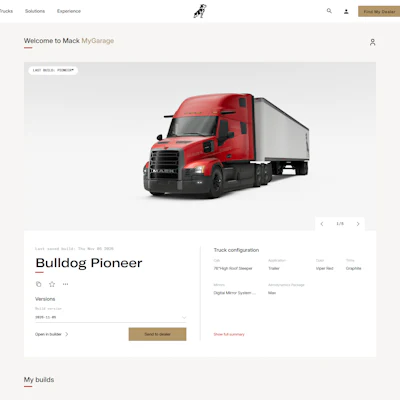
Mack Trucks introduces MyGarage, an free online tool for customers to save, organize and revisit Mack truck configurations, making it easier to move from online truck building to discussions with a Mack dealer.
Mack says MyGarage builds on the Mack Truck Builder experience by enabling customers to save multiple configurations so they can return to their work rather than recreate a build each time. The expanded Truck Builder personalization also allows customers to add their company logo. Mack says customers can name individual configurations, review truck images and selected specifications, search and filter saved builds and reopen a configuration in Truck Builder to continue refining it.
“Customers often want to explore different configurations before deciding what works best for their operation, and MyGarage makes it easier for them to do that on their own schedule,” says David Galbraith, Mack Trucks vice president of global brand and marketing. “They can save their work, return to it when they’re ready and then share that configuration with a Mack dealer. It creates a more convenient connection between configuring a truck online and having a conversation about the truck they need.”
When customers are ready to move forward, Mack says they send the saved configuration directly to a Mack dealer, offering a starting point for a discussion about the truck and their specific business needs. Mack’s Truck Builder previously enabled customers to save, share and modify builds and connect with a local Mack dealer once a configuration was complete.
[RELATED: Mack Trucks announces updated MyMack app]
Additionally, Mack states MyGarage gives customers the ability to:
- Save and name multiple truck builds, making different configurations easy to identify and organize.
- Review configuration details, including truck images and selected specifications, with the option to access a more complete summary.
- Search and filter saved builds by truck model or category.
- Reopen and refine builds by returning a saved configuration to Mack Truck Builder and continuing to customize it.
- View different build versions, helping customers revisit configurations as their selections evolve.
- Send a saved build to a dealer, giving the dealer the customer’s configuration as a starting point for the next stage of the process.
Mack also is adding a separate personalization capability to its online Truck Builder. The ability for customers to add a company logo to a truck they are configuring was previously was available only to Mack dealers. The capability gives customers a better way to visualize how a configured Mack truck could look with their company’s branding before reaching the dealer, the company says.


“Adding a company logo lets customers make the experience even more personal,” Galbraith says. “They’re not just looking at a truck configuration. They can begin to see what that truck could look like as part of their own fleet. Combined with MyGarage, it gives customers more flexibility to explore, personalize and save their ideas before taking the next step with their dealer.”
Mack Truck Builder is a free online tool that lets customers design and personalize Mack models, including the Mack Pioneer, Mack Granite, Mack Anthem, Mack Keystone, Mack MD Series and the Mack LR.